
How to Check NOL Card Balance History in 2026

Keeping a check on your Nol balance is necessary to make your Dubai tour more exciting and hassle-free. By knowing your card balance and transaction history, you can better plan your travel according to your budget, time, and places to explore in Dubai.
Through the official website of the Roads and Transport Authority or the RTA mobile app, you can easily get your NOL card balance, check history, and schedule your journey accordingly.
Let’s have a detailed look at how visitors across Dubai can check their NOL transaction history offline or online, and why it is needed!
Why Knowing Your NOL Balance History is Important?
According to a recent report by the Dubai Department of Economy and Tourism, around 8.68M visitors are welcomed in Dubai from January to May 2026. To manage such a huge number of tourists, a seamless public transport system is essential for both visitors and residents.
The Roads and Transport Authority (RTA) ensures smooth travel through the NOL card system by providing a hassle-free, cashless experience. However, keep tracking your NOL card’s transaction history to help avoid travel disruptions and provide the following benefits to NOL users.
Better Management of Budget
By regularly reviewing your NOL card transaction history, you can effectively manage expenses like travel, shopping, and refreshments. This will help prevent financial hurdles during your trip, ensuring a smoother and hassle-free experience.
More Fun and Exploration
Knowing your available balance helps in better travel planning. With clear budget insights, you can explore more, have greater fun, and make the most of your journey. So, it’s always advisable to carry your NOL card, keep it recharged, and check its expiry before you set off.
Easier Dispute Resolution for Incorrect Deductions
Checking your NOL transaction history enables you to spot any unusual charges. If you notice a suspicious fare deduction, you can raise a dispute with RTA’s customer care department for a quick solution.
How to Check Your NOL Card Balance History Online?
Getting details of your NOL balance history online is quick and simple. The two common and convenient ways to access your account details and transaction history are mentioned below:
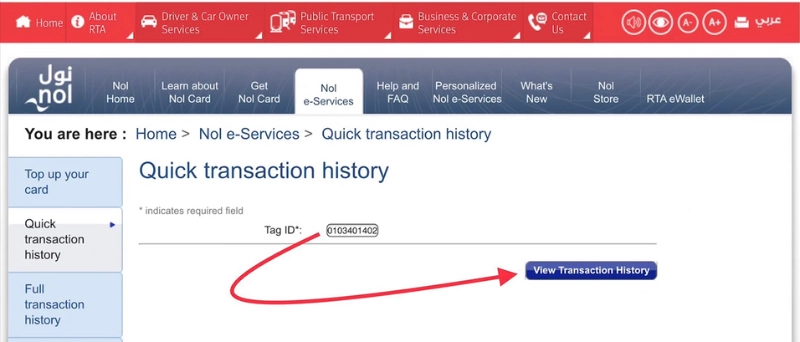
Online Portal of the RTA
One of the easiest ways to view your NOL balance history is through the official Roads and Transport Authority (RTA) website.
RTA Mobile App
You can also access your NOL travel history through the official RTA mobile applications.
How to Check your NOL Balance History Offline?
Seek Customer Service Assistance
You can get the details of your NOL card balance and transaction history by directly contacting the Customer Care team of the Roads and Transport Authority, Dubai.
The Customer Representative will ask you about your NOL Card Number and do some verifications before providing you with the complete account information.
SMS Method
This is a convenient offline option for users who want to access their Nol account details offline. You just need to follow these quick steps below to know your balance history via SMS.
Standard SMS charges may apply depending on your mobile network, so make sure you have sufficient balance.
Metro Stations Vending Machines
Along with other methods for checking the NOL transaction history, Metro Vending Machines in Dubai offer an easier facility to check your balance history offline.
Just follow the simple steps & make your journey smoother:
Authorized Retailers and Merchant Shops
Through authorized retailers and Merchant shops in Dubai, you can easily get information about your Nol available balance and transaction history. Just visit your nearest authorized merchant or retail shop and provide your account number to the cashier. He will do some verifications for security purposes before providing you with the details for security purposes.
What Information Can You Get From the NOL Card’s Balance History?
Besides revealing your travel history, checking your NOL card’s balance history gives you a detailed overview, beyond just metro and bus rides. Here’s what you’ll know about: