

NOL Card Balance Check Online
Contents
What is an NOL Card?
The NOL card is a smart electronic card issued by Dubai's Roads and Transport Authority (RTA) for residents and visitors in the UAE. It carries prepaid credit that can be used to pay fares across various public transport modes, including Metro, trams, buses, and taxis in Dubai.
This secure and rechargeable card provides a convenient way to travel and pay across the city, saving you time, money, and hassle.
Instantly Check your NOL Card Balance Online
Simply enter your 14-digit NOL Tag ID in the input field and press 'Check NOL Card Balance.' You will be redirected to the official RTA website, where you can quickly view your balance.
How to Check NOL Card Balance Online?
Staying updated on your Nol Card Balance in Dubai is quick and hassle-free. Whether you're traveling or at home, there are multiple convenient ways to check your balance and make sure you always have enough credit to travel smoothly. Explore the methods below to choose the one that works best for you!
NOL Card Balance Check Via RTA Website

This is the most secure and accurate way to check your NOL card balance because it is the official website. In this way, you can check real-time updates of your balance comfortably from your home, office, or any other place.
Check NOL Balance by SMS
Looking for a quick way to check your NOL balance without having to connect to the internet? Try checking it via SMS.
Check NOL Card Balance at Metro
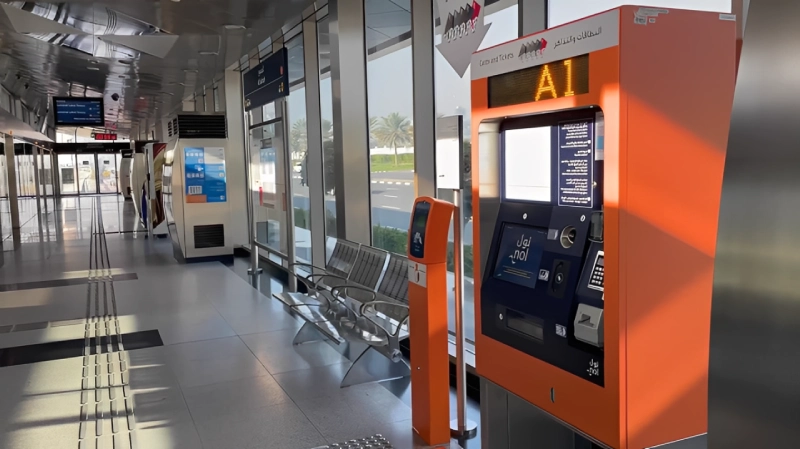
Are you near a metro station? Swipe your NOL card at a self-service kiosk, available in every metro and bus station in Dubai. These strategically located standalone digital machines not only allow you to view your current balance, but also let you recharge your card quickly.
Check NOL Card Balance History Via the Pay App
Take advantage of the NOL pay app to travel around Dubai smartly and stay informed. More than just a balance display, it allows you to recharge, add travel passes, activate them and more! You can download it now for both Android and iOS devices. It is also available through AppGallery for Huawei users.
Different Types of NOL Cards
RTA introduced different types of NOL cards to ensure that everyone can benefit from them according to their travel habits. Here's a breakdown of the different cards with personalized benefits:

Red NOL Ticket
The Red NOL Ticket is a paper-based disposable card tailored for tourists, occasional travellers, or anyone taking short trips. It is priced at around AED 2 per trip, valid for 90 days, and lasts for 10 trips.

Silver NOL Card
The Silver NOL Card is a budget-friendly, reusable, and rechargeable card ideal for daily commuters. The activation cost is AED 25, which includes a balance of AED 19. This card has a validity of 5 years. For non-registered users, the recharge limit is AED 1000, whereas registered users can recharge up to AED 5000.

Gold NOL Card
The Gold NOL Card is a deluxe travel card offering an exclusive experience with the private gold cabin on the Dubai metro and tram. Similar to the Silver Card, the activation fee is AED 25 with a balance of AED 19, and it has a validity period of 5 years.

Blue NOL Card
The Blue NOL Card is personalized and provides discounts of up to 50% for students and seniors, and a 100% concession for people with disabilities. It costs AED 70 with an additional AED 20 credit. The card is linked to your Emirates ID, making it easy to recover the balance in case it is lost. It has a 5-year validity period.

Virtual NOL Card
The Virtual NOL Card offers a smarter and more digitized way of traveling. You can activate your Virtual Card in the NOL Pay app, and it is compatible with Samsung and Huawei phones, as well as the Huawei Watch 3 and 4 Pro. This version provides the convenience of digital payments without needing a physical card.
Advantages of the RTA NOL Card
The RTA NOL card provides numerous benefits that make your travel and shopping experience in Dubai more seamless and cost-effective. Here are some of the key advantages:
Travel and Shop
The NOL card can be used across all modes of RTA public transportation, including the metro, tram, buses, taxis, and marine transport. It also supports RTA parking and is accepted at retail stores, pharmacies, restaurants, and more.
Pay Without Cash
With the NOL card, there’s no need to carry cash. Simply load a balance, and payments will be automatically deducted as you use it, offering a convenient and cashless way to travel and shop.
Cost-Effective
The NOL card offers a lower cost per trip compared to standard transport tickets and remains valid for up to five years. Recharging is easy and available at metro stations, through the NOL app, or online.
Check Balance Anytime
Keep track of your spending by checking your balance at any time using the NOL balance check tools—NOL app, SMS, and website. Knowing your balance allows for better management of your travel and purchases.
Discounts
The NOL card offers special discounts for students, people with determination, and seniors (60+). These discounts are available for both retail and public transportation fares.
Multiple Recharge Options
Recharge your NOL card with ease. Whether you prefer online recharge through the NOL app, using vending machines, or visiting agent stores and petrol stations, multiple recharge options are available to suit your preferences.
Dubai RTA Customer Service
If you have any questions about your card, whether it is lost, not working, damaged, or if you have any other similar issues, you can contact RTA customer service. Also, Blue Card holders can get a refund if they lose their card. Below are the RTA Customer Service details:
| Service | Details |
|---|---|
| Operating Hours |
Monday to Thursday: 07:30 AM to 03:30 PM Friday: 08:00 AM to 12:30 PM |
| Call Center | 800 90 90 |
| Contact Number for Overseas Callers | +971 4 605 1414 |
| [email protected] | |
| Fax | +971 4 206 5555 |
| RTA Facebook | RTA Dubai |
| RTA Twitter | RTA Twitter |
| RTA Instagram | RTA Dubai Instagram |
Frequently Asked Questions (FAQs)
How Can I Check the Validity of NOL Cards?
You can check the expiration date of your NOL Card by tapping it at any ticket vending machine or parking meter. The screen will display the balance and remaining validity days. In addition, you can view your NOL card expiry date online through the RTA website or the RTA Dubai App by entering your Tag ID.
Can I top up my NOL card online?
Yes, you can recharge your NOL card online through the official RTA website or the RTA Dubai App. You simply need to enter your NOL Tag ID, select the top-up amount, and pay with a debit or credit card. It may take 45 minutes to 4 hours for the balance to appear in your account, so it's best to wait for the confirmation message or email before using the card.
What is the minimum balance required for a UAE NOL card?
To travel on the Metro or bus in Dubai, NOL card users must maintain a minimum balance of AED 7.50. To travel round-trip, a Silver Card balance must be at least AED 15, and a Gold Card balance at least AED 30.
Can I visit the Dubai Metro without an NOL Card?
No, the only way to travel through the Dubai Metro is with an NOL Card. Tourists can, however, purchase the NOL Red Ticket, which allows for 5 daily passes or 10 journeys.
Can I recharge my NOL card using a debit card?
Yes, you can recharge your NOL balance using a debit card through the RTA website, the RTA Dubai app, or ticket vending machines. Simply select the top-up option, enter your NOL Tag ID number, add the amount, and pay securely with your debit card.